Starter
$9 / month
Side projects and small apps.
- 10 hours of audio each month · $0.90 / hour
- 500 YouTube videos a month
- Then $0.018 per extra minute
- 5 transcriptions at once
- All five output formats
Who said what, with timestamps. Subtitles and a PDF too.
Email and a one-time code. No password.
Audio or video, up to 5 GB.
Text, subtitles and a PDF, a few minutes later.
A few sentences on what was said.
Speakers labelled and timestamped, on every plan.
Detected automatically.
A 76-minute, ten-speaker public-domain recording, as it came back.
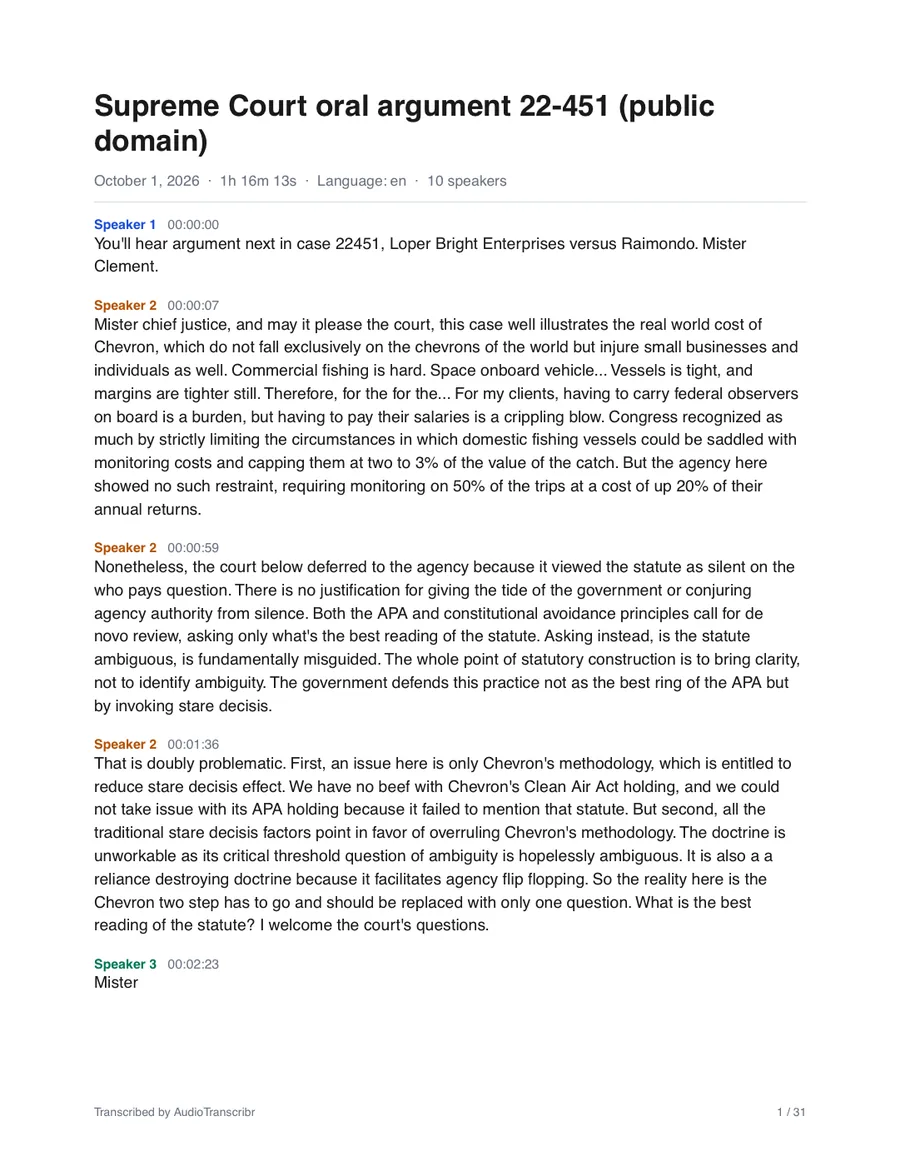
Speakers, timestamps, 31 pages. The same upload produced the four files below.
Transcribed in 18 seconds.
Decisions and action items, searchable.
Quotes with timestamps and speakers.
Two hours of talking, ten minutes of reading.
Show notes and captions from one upload.
A clean PDF for the file.
Thoughts on the go, as text.
Audio after 7 days, transcripts after 30 — or sooner, by you.
Your audio is used only to produce your transcript.
In transit and in storage; cards are handled by Stripe.
Start free: your first transcription is on us. Upgrade when you need more.
$9 / month
Side projects and small apps.
$29 / month
or $290 a year · two months free
Production workloads.
$99 / month
High volume, agencies, back catalogs.
Need pay-as-you-go or more volume? Contact us. How we compare: youtubetranscript.dev · Otter.ai · Rev · Sonix · Descript · TurboScribe · Happy Scribe.
The same service as a REST API and an MCP server for AI tools.
Create a free account with your email address — we send a code, there is no password and no card. Your first transcription is free whatever its length; after that you get 5 minutes a month, or pick a plan. Upload a file on the dashboard, or create an API key under “API & connectors” to use it from code.
No. Everything happens in the browser: upload on the dashboard, download the files when they are ready. Developers can use the same service from code or an AI assistant instead.
Common audio and video formats — MP3, M4A, WAV, FLAC, OGG, MP4, MOV, WebM and more. Upload the file, or pass a public URL and we fetch it. YouTube video links work too: we import the video’s captions in seconds.
YouTube, yes: paste a video link and we import its caption track, usually in seconds, as the same TXT, SRT, VTT, JSON and PDF files. Captions carry no speaker labels, and a video without captions cannot be imported (download its audio and upload that instead). Each plan includes a number of YouTube videos a month, 2 on the free account. Spotify, SoundCloud, Apple Podcasts and Drive share links are web pages, not files: download the file and upload it.
Yes, on every plan, including Free. Speaker labels appear in the JSON, the text file, the VTT voice tags and the PDF.
Plans include a monthly allowance of audio. On paid plans, extra minutes are billed per second at the plan's overage rate, so a busy month never stops your app. The free account gets one transcription free, then 5 minutes a month, and stops there. Change or cancel any time.
Uploaded media is deleted automatically after 7 days and transcripts after 30 days. You can delete a transcription and its files immediately with one API call.
Leave the language out and it is detected automatically — 35 languages, including English, Spanish, French, German, Portuguese, Italian, Dutch, Russian, Polish, Turkish, Hindi, Japanese, Korean, Chinese, Indonesian and Vietnamese. Set it explicitly (es, pt-BR, ar, he, zh-TW …) to reach 60+ languages, including Arabic, Hebrew, Bengali, Tamil and Urdu. Speaker labels work in every language.
All questions · Something else? Contact us.